Demo Data
Demo Data
To quickly test out SurrealDB and SurrealQL functionality, we've included demo data here in .surql files which you can download and import into SurrealDB using the CLI
Surreal Deal - deals so good it's surreal!
Surreal Deal is a demo dataset based on a simplified e-commerce platform that sells artwork.
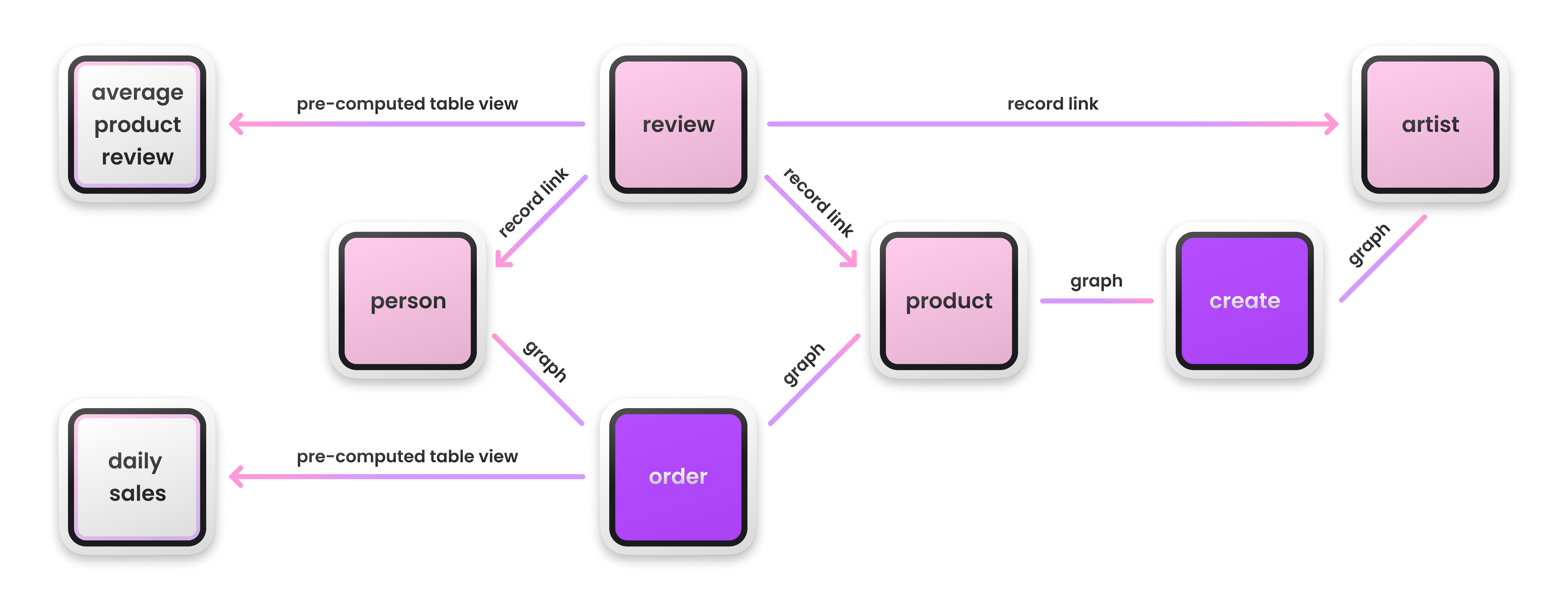
The dataset is made up of 8 tables using both graph relations and record links:
person, order, product, review, artist, create, avg_product_review, daily_sales.
In the diagram below, the nodes in pink are the standard tables, the ones in purple represent the edge tables which shows relationships between records and SurrealDB as a graph database. While the nodes in gray are the pre-computed table views.
Download
| Dataset | URL |
|---|---|
| Surreal Deal | https://datasets.surrealdb.com/surreal-deal-v1.surql |
| Surreal Deal (mini) | https://datasets.surrealdb.com/surreal-deal-mini-v1.surql |
Import
First, download any of the available datasets.
Secondly, start the server.
# Create a new in-memory server
surreal start --user root --pass root --allow-all
Lastly, use the import command to add the dataset.
Use the command below to import the surreal deal dataset:
surreal import --conn http://localhost:8000 --user root --pass root --ns test --db test surreal-deal-v1.surql
To import the surreal downloaded the Surreal Deal (mini) use the command below:
surreal import --conn http://localhost:8000 --user root --pass root --ns test --db test surreal-deal-mini-v1.surql
Please be aware that the import process might take a few seconds.
Using Curl
First, start the surrealdb server
# Create a new in-memory server
surreal start --user root --pass root --allow-all
Then, download the file and load it into the database
# Download the file
curl -L "https://datasets.surrealdb.com/surreal-deal-v1.surql" -o surreal-deal-v1.surql

# Load the file into the database using the rest endpoint
curl -v -X POST -u "root:root" -H "NS: test" -H "DB: test" -H "Accept: application/json" --data-binary @surreal-deal-v1.surql http://localhost:8000/import
If you want to use the mini version:
# Download the file
curl -L "https://datasets.surrealdb.com/surreal-deal-mini-v1.surql" -o surreal-deal-mini-v1.surql

# Load the file into the database using the rest endpoint
curl -v -X POST -u "root:root" -H "NS: test" -H "DB: test" -H "Accept: application/json" --data-binary @surreal-deal-mini-v1.surql http://localhost:8000/import